Battle reminders, matchup updates and manager inbox alerts
Manager enrollment · Public review copy
Manager text signup
An optional signup for new Requested inbox items and updates about the creators you directly manage.
These screenshots show the signup controls with fictional data in an isolated demonstration. They are not a live signup form. Viewing this page sends no code and enrolls no account. The app shows whether verification and sending are currently available.
1. Choose settings and give consent
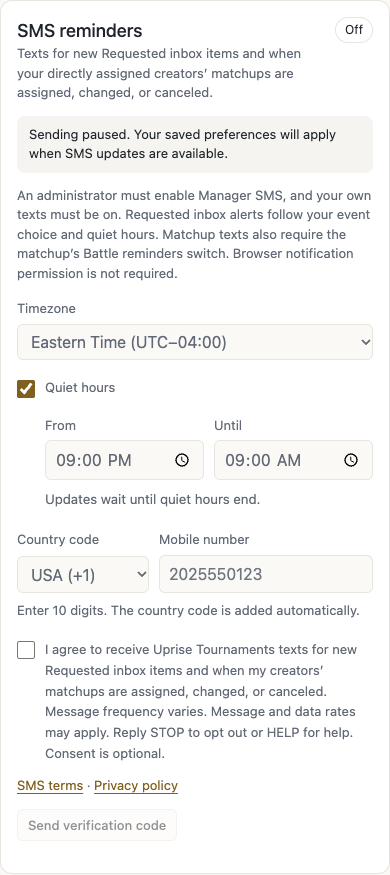
Sign in at Uprise Manager Portal and open Profile → SMS → SMS reminders. Texts start off. Choose USA or Canada, enter your own mobile number, and confirm your timezone. Quiet hours default to 9 PM–9 AM and may be changed or disabled.
The consent checkbox is separate and initially unchecked. SMS terms and privacy links appear next to it. The exact disclosure is:
I agree to receive Uprise Tournaments texts for new Requested inbox items and when my creators’ matchups are assigned, changed, or canceled. Message frequency varies. Message and data rates may apply. Reply STOP to opt out or HELP for help. Consent is optional.
Current signup controls with empty fictional contact data and unchecked consent. Verification availability is simulated; no text is sent.
2. Verify your own number
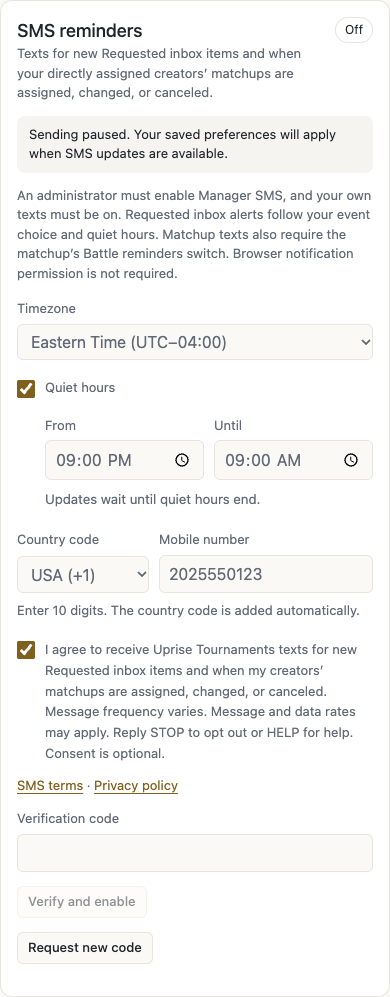
After checking consent, select Send verification code. Enter the requested code and select Verify and enable. Only a successful verification completes manager enrollment and saves the preference. The phone number shown in this illustration is fictional and the code field is empty.
The verification step uses the same implemented form. This illustration sends no SMS.
3. Receive optional inbox alerts and matchup updates
A paused program stays paused after enrollment. When sending and the Manager welcome template are enabled, a welcome confirmation precedes updates. Managers receive an alert when a new creator request, manager proposal, organizer matchup or change request appears in their Requested inbox. Inbox review links require sign-in. They also receive assignments, participant/team changes, schedule changes or clearing, removals, and cancellations for directly controlled creators. Messages may include a public matchup Scoreboard link. Frequency varies with edits; managers do not receive scheduled 24-hour or 1-hour reminders.
Creators and managers consent independently. Staff access or a creator’s signup does not enroll the manager. Managers can choose which events send texts, adjust quiet hours, turn texts off, remove their number, and see their own text history in Profile → SMS. Requested inbox alerts are independent of each matchup’s Battle reminders switch. Existing inbox items are not sent as a backlog when alerts start.
Manager SMS must be enabled
The administrator’s Manager SMS setting controls manager verification codes, welcome texts, Requested alerts and matchup updates. When it is off, a manager’s personal settings cannot enable new sending. Texts already accepted by the delivery provider may still arrive. Turning Manager SMS back on does not send a backlog of missed Requested alerts.
Administrators can also enable or disable each manager message under Message templates → Global template sending and save the template. The eleven Manager templates cover welcome, six Request Item types, new matchup, matchup changed, creator removed and matchup canceled. The same list includes seven Creator templates, with All, Creator and Manager filters. The master Manager SMS setting still overrides them. If welcome is disabled, other enabled alerts can follow verified signup; reenabling does not send a late welcome to an enrollment that was skipped.
With both global templates and personal event choices enabled, a new Organizer matchup sends one Requested alert instead of an additional assignment text for the same action. Separate later changes can still send their own updates. Repeated checks, restarts and uncertain delivery responses do not create a second send for the same alert.
Example manager texts
These fictional examples use the current default message templates and the same rendering code as delivery. Your administrator can customize the wording. Manager texts always start with Uprise Portal: and end with the required STOP footer. Review links require sign-in; matchup links show public battle details. Viewing these examples sends no text.
New creator request
A creator submits a new battle request that appears in your Requested inbox.
Uprise Portal: New creator battle request for @avery.live in Requested.
Review: https://portal.example/#battles/requests?folder=requested&creatorId=11111111-1111-4111-8111-111111111111&creatorRequest=22222222-2222-4222-8222-222222222222

Reply STOP to opt out.
New manager battle request
Another manager submits a battle request for your creator.
Uprise Portal: New manager battle request for @avery.live in Requested.
Review: https://portal.example/#battles/requests?folder=requested&creatorId=11111111-1111-4111-8111-111111111111&creatorRequest=22222222-2222-4222-8222-222222222222
Requested by Jordan.

Reply STOP to opt out.
Manager proposal needing approval
Another manager sends a proposal that needs your review.
Uprise Portal: New manager approval request for @avery.live in Requested.
Review: https://portal.example/#battles/requests?folder=requested&creatorId=11111111-1111-4111-8111-111111111111&creatorRequest=22222222-2222-4222-8222-222222222222
Requested by Jordan.

Reply STOP to opt out.
Matchup sign-off
Every new matchup needs manager sign-off, including Series, cross-agency and manager-planned battles once published. Existing approval steps still apply before publication; already-published matchups are not made pending retroactively. In Matchups, select Sign off and review the confirmation before saving. Signing off releases Creator SMS with the matchup details and opponent link for your eligible opted-in creators; SMS settings and quiet hours still apply. Each responsible manager signs off separately. Red asterisks before the top Matchups tab and Ready mark actionable matchups needing your sign-off. Both disappear when none remain. Saved sign-offs show Signed off. You can also review the same task in Requests. The assignment sends one manager alert rather than a second manager assignment text.
Uprise Portal: New organizer matchup request for @avery.live in Requested.
Review: https://portal.example/#battles/requests?folder=requested&organizerRequest=22222222-2222-4222-8222-222222222222

Reply STOP to opt out.
New matchup change request
A proposed change needs your response. The proposal does not change the published schedule; a later finalized change can send a separate update.
Uprise Portal: New matchup change request for @avery.live in Requested.
Review: https://portal.example/#battles/requests?folder=requested&changeRequest=22222222-2222-4222-8222-222222222222

Reply STOP to opt out.
Creator removal requested
A creator manager requests removal from a matchup. The organizer can arrange a replacement or acknowledge removal, and opponent managers acknowledge independently.
Uprise Portal: New creator removal request for @avery.live in Requested.
Review: https://portal.example/#battles/requests?folder=requested&removalRequest=22222222-2222-4222-8222-222222222222

Reply STOP to opt out.
New matchup assigned
A complete matchup is assigned to your directly managed creator. This example applies when that action is not already covered by a Requested alert.
Uprise Portal: New matchup details for @avery.live.
@avery.live: matchup assigned.
Opponent: @mila.live
Oct 16, 7:30 PM EDT
Matchup: https://tournaments.example/matchup/Q7m2kA9rX4bN8vT3sL6cPw

Reply STOP to opt out.
Schedule changed
The same matchup moves from 7 PM to 7:30 PM Eastern.
Uprise Portal: Matchup details changed for @avery.live.
@avery.live: matchup schedule changed from Oct 16, 7:00 PM EDT.
Opponent: @mila.live
Oct 16, 7:30 PM EDT
Matchup: https://tournaments.example/matchup/Q7m2kA9rX4bN8vT3sL6cPw

Reply STOP to opt out.
Opponent changed
The opponent changes from @mila.live to @kai.live; the schedule stays the same.
Uprise Portal: Matchup details changed for @avery.live.
@avery.live: matchup participants changed.
Opponent: @kai.live
Oct 16, 7:30 PM EDT
Matchup: https://tournaments.example/matchup/Q7m2kA9rX4bN8vT3sL6cPw

Reply STOP to opt out.
Series rules changed
The series changes from Best 2 of 3 to Best 3 of 5; the schedule stays the same.
Uprise Portal: Matchup details changed for @avery.live.
@avery.live: matchup rules changed from Best 2 of 3 to Best 3 of 5.
Rules: Best 3 of 5
Opponent: @mila.live
Oct 16, 7:30 PM EDT
Matchup: https://tournaments.example/matchup/Q7m2kA9rX4bN8vT3sL6cPw

Reply STOP to opt out.
Your creator removed
Your directly managed creator is removed from the matchup.
Uprise Portal: A matchup update for @avery.live.
@avery.live: matchup @avery.live removed; participants changed.
Previous Opponent: @mila.live
Oct 16, 7:30 PM EDT
Matchup: https://tournaments.example/matchup/Q7m2kA9rX4bN8vT3sL6cPw

Reply STOP to opt out.
Matchup canceled
An upcoming matchup is canceled.
Uprise Portal: A matchup update for @avery.live.
@avery.live: matchup canceled.
Opponent: @mila.live
Oct 16, 7:30 PM EDT
Matchup: https://tournaments.example/matchup/Q7m2kA9rX4bN8vT3sL6cPw

Reply STOP to opt out.
Welcome after verified signup
When Manager welcome is enabled, it confirms your verified signup before other alerts. The administrator can disable this template independently.
Uprise Portal: You signed up for Manager SMS alerts on action items and creators' matchup updates. Message and data rates may apply.

Reply HELP for help.

Reply STOP to opt out.
Reply STOP to stop program texts. Staff cannot override STOP. START removes the opt-out but does not enable a disabled preference; valid consent and active program settings are still required. Reply HELP or email admin@theuprisetalent.com for assistance. Consent is optional and is not required to use the app or manage creators.